The SaaS Stack Problem: Why Adding More Tools Slows Your Team Down
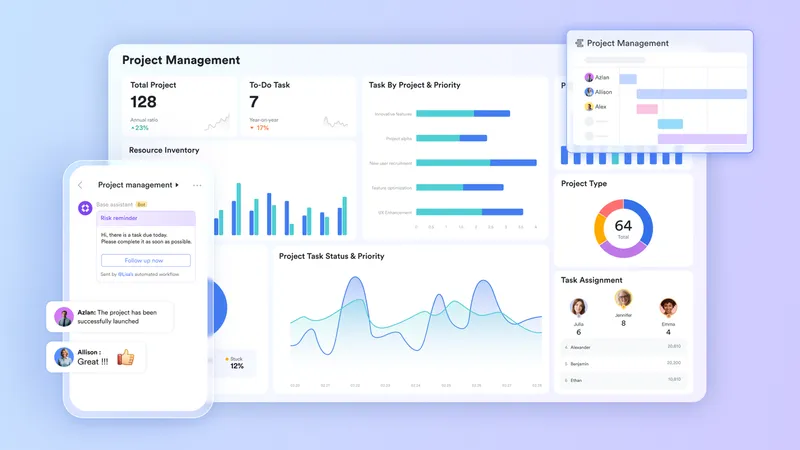
Every tool in a company's SaaS stack was added with good intentions. The chat app improved communication. The project tracker improved accountability. The doc tool improved collaboration. The database improved data management. Each addition made sense at the time, and each one solved the specific problem it was purchased to solve. But the collective effect of five well-chosen tools is not five times the productivity. It is five notification streams, five sets of login credentials, five different places where work might be happening, and a growing volume of invisible manual labor required to keep them all pointing in the same direction. The solution is not to find better individual tools. It is to move toward project management tools that handle multiple functions within a single environment.
Ending the chat scatter problem with Lark Messenger
-2-800x450.webp?2026-04-22T09:22:57.805Z)
Reducing notification overload and improving focus. Knowledge workers often check communication tools frequently, not because of urgency but due to the fear of missing important updates. Lark Messenger helps address this by structuring communication so that important information is easier to identify without constant monitoring.
Custom notification control by channel priority. With group folder organization and notification settings, team members can decide which conversations require immediate attention and which can be reviewed later. For example, client-facing channels can trigger instant alerts, while internal or non-critical discussions can be checked on a schedule.
Keeping discussions organized with threads. Features like “Chat Tabs & Threads” help contain project-specific conversations within dedicated threads. This keeps main group chats focused on key updates and decisions, reducing clutter from detailed back-and-forth discussions.
Eliminating the spreadsheet-database gap with Lark Base
-1-800x450.webp?2026-04-22T09:23:11.754Z)
- Relational records with people fields and date pickers. Lark Base allows teams to build operational databases with the field types that project tracking actually requires: assignee fields that pull from the team directory, date pickers for deadlines, and dropdown menus for status. These fields make the database self-documenting in a way that a spreadsheet with typed text never can be.
- Automated cross-tool notifications. When a record in Base changes status, a notification can be sent automatically to the relevant Messenger group, the assigned team member's direct messages, or an email address. The status change and the communication of that change happen as a single automated action rather than two sequential manual steps.
- Dashboard views for leadership reporting. Lark Base dashboards let leadership see live operational charts without waiting for someone to compile a report. Revenue by region, open tasks by department, and project completion rates are all visible in real time from the same database that the operational team uses daily.
Removing the internal/external communication divide with Lark Mail
-3-800x450.webp?2026-04-22T09:23:28.014Z)
Bridging internal and external communication gaps. Most companies rely on separate tools for internal chat and external email, creating extra work to relay information between systems. Lark Mail brings email into the same workspace as team communication and workflows, reducing the need to manually transfer context between tools.
Supporting business email account linking. The “Email Client” feature allows teams to link third-party business email accounts such as Google Workspace (Gmail for business), Microsoft 365, or Zoho Mail. Personal email accounts (e.g., gmail.com or outlook.com) are not supported for linking.
Managing email within a unified workspace. Once connected, teams can handle external email alongside internal work in one place, minimizing tool switching. Some features may be limited for linked accounts, and synced emails will use Lark storage space.
Documents that work as hard as you do with Lark Docs
-3-800x450.webp?2026-04-22T09:23:51.074Z)
- "@mention" for in-document task assignment. Any team member mentioned in a Lark Docs receives an immediate notification and can respond directly from within the document. Ownership of actions is established at the point of writing rather than communicated separately in a task tool.
- Embedded live data from Base and Sheets. Lark Docs can contain live tables and charts pulled directly from connected Lark tools, so a project brief or strategy document is always current rather than a static snapshot that becomes outdated the moment the underlying data changes.
- Real-time co-editing with full contributor visibility. Up to 200 people can edit the same document at the same time, with each contributor's cursor visible to all active editors. Documents that require cross-functional input get built in one session rather than assembled from emailed drafts.
Replacing the standalone presentation tool with Lark Slides
-2-800x450.webp?2026-04-22T09:24:03.035Z)
- Linked Sheets charts that update automatically. Charts embedded in a Lark Slides presentation pull data from connected Lark Sheets sources and refresh when the underlying numbers change. The weekly business review deck, the investor update, and the board presentation stay current without a pre-meeting rebuild.
- Presentation templates for brand-consistent output. Teams can build and share standard presentation templates so that every deck produced by every team member follows the same structure and visual style, regardless of design skill or time available.
- Live link sharing for on-demand review. Any Lark Slides presentation can be shared via a permanent link that opens on any device, allowing stakeholders to review the latest version on their own schedule rather than waiting for a scheduled share session.
Bonus: The real cost of the five-tool stack
Before consolidating their workspace, most teams compare Google Workspace pricing with individual subscriptions for specialist tools and conclude that the specialist tools offer better functionality per category. That calculation is technically correct but strategically incomplete.
The missing line item is the operational cost of maintaining the connections between those tools: the person whose job is partly to copy data from one system to another, the weekly meeting that exists because two tools don't share a common status view, and the onboarding overhead of training every new hire on five different interfaces. When those costs are added to the per-seat subscription fees, the economy of consolidation shifts dramatically. A unified platform costs less and returns more, because of the value of any individual tool compound when it shares an environment with others.
Conclusion
The SaaS stack problem is not solved by finding a better version of each tool. It is solved by reducing the number of places where work can happen and information can hide. Building your team's workflow on a connected set of productivity tools that handles communication, data, documents, and presentations in one environment removes the friction between tools and gives the team's attention back to the work itself.